
Sticky Reminders2.1.2 - Google Play
You'll be able to see results in few seconds.
Publisher Description

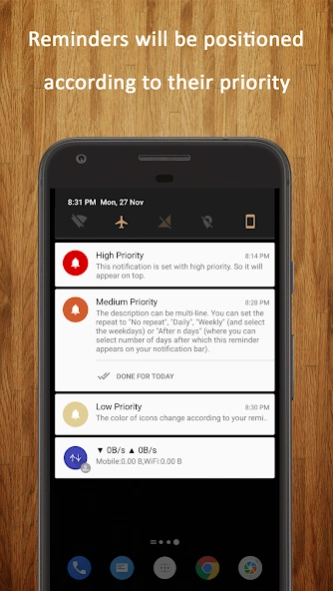
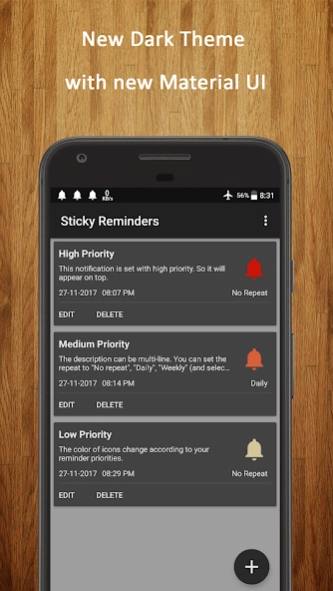
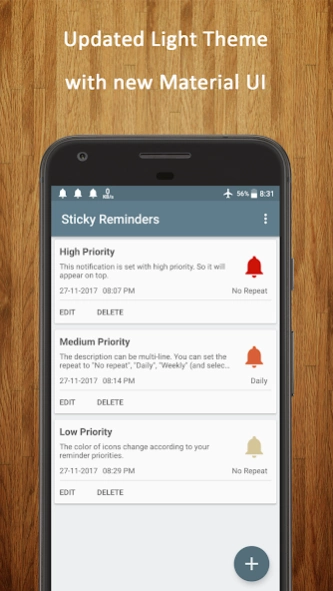
Sticky Reminders on notification bar never lets you miss out anything!
How many times has it happened to you that you set a reminder and end up removing it from notification bar and forgetting it later? Need to buy some groceries, call some old friend or pay some bill by the end of the day, Sticky Reminders will help you complete all these kind of tasks. This app puts the reminders on your notification area (which will also be visible on lock-screen) and they are persistent. They don't go off on swiping or even when you clear all notifications.
Features:
• Create: Create your custom notifications which always stays on the notification bar (even on lock-screen).
• Edit: Edit your reminders by tapping on them from notification bar or from "View All" menu.
• Prioritize: You can set priority of the reminders. Higher the priority higher is the position on the notification bar.
• Schedule: Don't want the reminder to appear on the notification bar from the time you create it? Schedule the reminder for a later time and the reminder will appear on your notification bar from that mentioned time.
• View All: View all of your scheduled reminders at one place and edit or delete them.
• Sort: You can sort all your reminders based on the priority you had set or on the scheduled time.
• Colors: Icon colors based on the priority to help you recognize them easily.
• Battery & Memory Friendly: It won't drain your devices battery or memory.
• Don't miss anything even if your device gets rebooted. All the reminders will stay on the notification bar.
**NOTE: On some of the devices, earlier set reminders do not show after the phone restarts. This issue is because of some phone manufacturers disabling apps to auto-start after phone reboot. Please check your phone settings and allow Sticky Reminders to auto-start or allow it in background apps.**
• Ads Free
Thank you Akshay Uppal, Rohit Kumar Sharma and all other friends for your valuable suggestions and feedback.
About Sticky Reminders
The company that develops Sticky Reminders is Shubhaw Kumar. The latest version released by its developer is 2.1.2.
To install Sticky Reminders on your Android device, just click the green Continue To App button above to start the installation process. The app is listed on our website since 2018-11-11 and was downloaded 0 times. We have already checked if the download link is safe, however for your own protection we recommend that you scan the downloaded app with your antivirus. Your antivirus may detect the Sticky Reminders as malware as malware if the download link to com.shubhaw.stickyreminders is broken.
How to install Sticky Reminders on your Android device:
- Click on the Continue To App button on our website. This will redirect you to Google Play.
- Once the Sticky Reminders is shown in the Google Play listing of your Android device, you can start its download and installation. Tap on the Install button located below the search bar and to the right of the app icon.
- A pop-up window with the permissions required by Sticky Reminders will be shown. Click on Accept to continue the process.
- Sticky Reminders will be downloaded onto your device, displaying a progress. Once the download completes, the installation will start and you'll get a notification after the installation is finished.
Program Details
System requirements
Download information
Pricing
Version History
version 2.1.2
posted on 2018-11-11
Bug Fixes:
- App crashes
- Reminders coming even after being deleted
- Repeating Reminders not coming after 2-3 occurrences
New Features:
- Added a DONE action for reminders. Completed reminders can be marked DONE (instead of mandatorily deleting the reminders). Helps keep track of your older reminders.
- Redesigned View All page
- Tap on any of the reminders to see the details like detailed description, next occurrence, etc.
- Current status of reminders can now be tracked
Disclaimer
Official Google Play Link
We do not host Sticky Reminders on our servers. We did not scan it for viruses, adware, spyware or other type of malware. This app is hosted by Google and passed their terms and conditions to be listed there. We recommend caution when installing it.
The Google Play link for Sticky Reminders is provided to you by apps112.com without any warranties, representations or guarantees of any kind, so access it at your own risk.
If you have questions regarding this particular app contact the publisher directly. For questions about the functionalities of apps112.com contact us.
